SIMION SYSTEMS / APPLICATIONS & AUTOMATION
Real project · Anonymous clientTwo sources.
One custom
application.
Advertising brings interest.
The app brings structure.
The form-based workflow implemented in the project.
THE WORK CONTINUES AFTER THE CLICK
An enquiry is not
a booking yet.
For an event services provider, a name and phone number are just the start. The date needs checking, the event needs understanding, and an offer needs preparing and following up.
I built a web application specifically for this process: enquiries from different sources, one shared workflow. Its custom interface supports offers and contact, including from a phone.
01 / WHERE ENQUIRIES COME FROM
Google. Meta.
One place to work.
Two intake paths, joined in the registry behind the app. Select a source to see the connection.
-
01
Google Ads
Traffic to the landing page
-
02
Website form
The visitor submits the details
-
03
Shared registry
The import stores the enquiry
-
04
Custom app
Offer, contact and follow-up
Website forms are imported automatically. Available source parameters can document the path; an app record alone does not prove conversion attribution in Google Ads.
-
01
Meta Ads
Ad with an instant form
-
02
Meta form
The enquiry is submitted on-platform
-
03
Automatic import
Make → registry → app
-
04
The same interface
The same workflow stages
This is the Meta form workflow implemented and used in the project. Its import was stopped when campaigns moved to direct messaging; this implementation does not automatically import Messenger or WhatsApp conversations.
02 / THE APPLICATION I BUILT
See the enquiry.
Know what comes next.
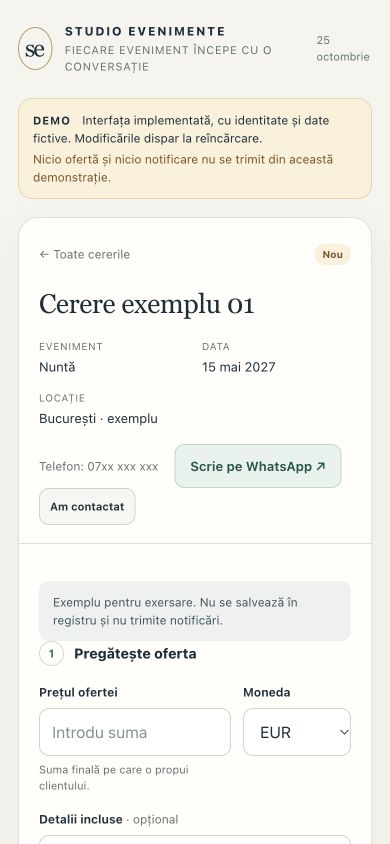
The implemented interface, shown with a fictional identity and data. Open enquiries, prepare an offer and change its stage in the demonstration below.
Try the applicationInteractive demo · fictional data · no messages sent
Choose “Cerere exemplu 01”, enter a price and confirm availability. Prepare the offer, then mark it as sent to see the next step. Reloading resets the demonstration. The original interface is in Romanian.
Open the full-screen demo ↗03 / FROM ENQUIRY TO RESPONSE
Four steps.
The context stays.
New enquiry
Event, date, location and contact details. The context for the conversation is ready.
Offer prepared
Price, currency, details and confirmed availability. The app assembles the message from the supplied information.
Direct contact
Phone and WhatsApp have separate actions. The provider sends the offer personally and records that it was sent.
Follow-up & outcome
A follow-up date, a reminder and an updated stage: offer sent, booked or lost.
BUILT FOR EVERYDAY WORK
The event.
The offer.
The conversation.
On a phone, the queue gives way to the enquiry details. Actions are explicit: contact, prepare, mark as sent and choose when to follow up.
Notifications are automated.
The conversation stays human.
WhatsApp opens for the selected contact. The app does not send the offer by itself or read replies in the conversation.
04 / MORE THAN AN INTERFACE
I also built
what you don’t see.
The underlying logic preserves the distinction between an enquiry received, an offer prepared and a send confirmed by the operator.
Intake & deduplication
Imports use identifiers to avoid reintroducing the same enquiry. Test records are separated from commercial records.
Prepared ≠ sent
Saving or copying an offer does not automatically mark it as sent. The person sending it records that confirmation.
Controlled reminders
Offers marked as sent receive a follow-up time. Closed stages stop follow-up, while notifications include duplicate protection.
Verified contact actions
The WhatsApp button was checked against 22 phone-number cases and 7 display scenarios. Missing or invalid numbers do not produce a contact link.
See the implementation components
Custom HTML, CSS and JavaScript interface. Google Apps Script for application logic, imports and notifications. Google Sheets for the registry and offer state. Make for Meta form intake during the form-based phase. Access to the real application is restricted to approved accounts.
Anonymous case study. Screenshots and the demonstration use only fictional identity and data. The demo is isolated from the client’s accounts, registry and automations. Workflows are described as implemented in their documented phase.