
Gmail and CRM, synchronised through checks in n8n
A prepared message is not a sent message. And a response from an integration is not enough to update CRM correctly. For SIMION SYSTEMS' internal processes, we built an n8n system that checks each stage before treating it as complete.
The problem: information can change between preparation and execution
A contact may already have a message in their history. A colleague may change the CRM row. A reply or a non-delivery notification may arrive after the list has been prepared. If automation relies only on the initial snapshot, it risks performing an action that is no longer appropriate.
The objective was to build a process with checks before sending and confirmations before changing the CRM status.
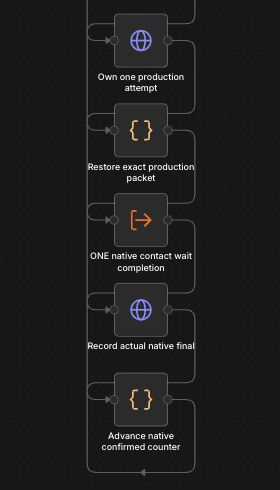
Two components, with clear responsibilities
This separation makes it possible to trace an action from its input data to the returned result. The confirmation counter advances after synchronisation is verified.
What is checked before sending
- Account and sender: the Gmail identity must match the expected configuration.
- The CRM row: identity, eligibility, values and metadata are compared with the prepared version. An intervening change can stop the action.
- Gmail history: earlier messages and non-delivery notifications are checked. A response with unfinished pagination is not treated as an empty history.
- Execution conditions: the sending interval and freshness of the registers are checked. The workflow includes revalidation after waiting.
In verification mode, the process can evaluate the contact without sending a message. Ineligible contacts are skipped with an explicit reason.
Sending must be confirmed by reading the message back
After the send request, the workflow reads the message back from Gmail. The code compares the message and thread identifiers with the response, then checks the sender, recipient, subject, content and SENT label.
If the exact check fails, the workflow is configured to stop without automatically resending at that step. SENT confirmation establishes that the message exists in Sent; it does not prove Inbox delivery or that it was read.

CRM is also checked after the update
Before writing, CRM is read again. If the row has changed after message confirmation, the code stops the update to preserve the human intervention. The data must be reconciled without sending again.
The write changes only the values needed for the date, status, next step and history. A final readback checks expected values, fields that should remain unchanged, formatting and validation rules. Only then is the result marked as sending and CRM confirmed.

What this project demonstrates
The deliverable is an internal system implemented in n8n, with Gmail–Google Sheets integration, eligibility checks, separate coordination and execution, and explicit stage confirmation.
Its technical value lies in how it handles changing data and uncertain results. The process preserves the distinction between prepared, checked, sent and synchronised.
Evidence boundary: this study documents the inspected configuration and code, together with real editor screenshots. It does not report processed volumes, time savings or measured commercial outcomes.
Does your process span several applications? SIMION SYSTEMS can analyse its steps and build the integrations and checks your system needs.